Short answer: connect the project to a GitHub repository in an account you control, which every plan at Lovable, Bolt, v0 and Replit allows and which Base44 offers from its Builder plan, then export separately what the repository never contains: your data, your user accounts, your files, your secrets and your production configuration. The terms of all five platforms assign the generated code to you; what decides whether you really own the app is whether you can run it without the platform.
Everything below was verified at the source on 13 September 2026, in the official documentation and terms of each tool. Those pages change often, so check the date on the page before acting on a detail.
What "export" gives you, platform by platform
Every builder gives you a way to get the files out. The differences lie in the plan required, in whether the copy stays in sync with the editor, and above all in where the rest of the app lives.
| Platform | Code export | Plan required | Where the data lives | What stays behind |
|---|---|---|---|---|
| Lovable | Two-way GitHub sync, ZIP ("Download codebase") | GitHub on all plans, ZIP on paid plans | Lovable Cloud or your own Supabase project | Data, storage files, edge function code, secrets |
| Bolt | Two-way GitHub sync, ZIP (Export, then Download) | No restriction documented | Bolt Database or your own Supabase project | Data until you claim the database, secrets, hosting |
| v0 | Private GitHub repository in your account, ZIP | No extra cost documented | Vercel project and the services you added | Environment variables, domain, data services |
| Replit | Download as zip, GitHub auto-sync | All plans, unless an Enterprise admin bans export | Replit database, storage and deployments | Secrets, database, deployment configuration |
| Base44 | Two-way GitHub sync, ZIP | Builder plan or higher for GitHub | Base44 platform, reached through its SDK | Entities and their data, authentication, integrations |
Lovable
The GitHub connection is available on every plan and works both ways: what you change in Lovable is committed to the repository, and what you push to the connected branch comes back into the editor. The repository is created in the GitHub account or organisation you choose, so make sure that account is yours and that you are its administrator. Renaming the repository is detected automatically; transferring it to another account breaks the sync, which is a good reason to create it in the right place from day one. On paid plans, Project settings, then Git, also offers a one-off "Download codebase" ZIP.
The data is the part to look at closely. With your own Supabase project, the database and the user accounts already live in an account you control. With Lovable Cloud, the documentation states that there is no one-click migration to your own Supabase project: you export the database (structure and data, up to 5 GB, one export every 24 hours), and that export does not include storage files, edge function code or secrets, which you move separately. Exports can no longer be downloaded once Cloud has been removed from the project, so export first and remove later.
Bolt
Click the project title, then Export and Download, to get a ZIP; the help centre notes that you need Node.js on your machine to run it. The GitHub integration commits your work automatically, checks GitHub every 30 seconds for changes made outside Bolt, and can only be managed by the project owner. If the app uses Bolt Database, the data lives in an account Bolt manages until you claim it: Database, then Advanced, then Claim moves the database into your own Supabase organisation, provided you are that organisation's owner. Careful with the opposite move: connecting another Supabase database to a project that already has a Bolt database replaces the connection, and the documentation warns that this may lose data.
v0
When you connect GitHub, v0 creates a private repository in your account and pushes the current code to it; from then on, the documentation says, that repository "becomes the source of truth for your project's code". You can also download a ZIP from the project menu. What the repository does not hold: the environment variables of the Vercel project, the domain, and whatever data service you plugged in (Neon, Supabase, Upstash or another), each with its own account and its own export path.
Replit
The three-dot menu at the top of the file tree offers "Download as zip"; the Git pane connects the project to GitHub, with an auto-sync option that works both ways. The documentation is explicit about what a copy of the project does not include: secrets, the database and the deployment configuration have to be set up again on the other side. One organisational detail: an Enterprise administrator can enable "Ban source code export", in which case the ZIP download disappears for members, so ask before you plan on it.
Base44
Two-way GitHub sync requires the Builder plan or higher; a ZIP download also exists. The
exported project contains the interface (src/), the server functions (functions/) and
the entity definitions, and depends on the @base44/sdk package. That last point matters:
the documentation states that with the GitHub integration, "entities are managed in Base44
and are not included in your local repository". Your tables and their contents stay on the
platform; they can be exported table by table as CSV from Dashboard, then Data. Running the
code elsewhere therefore means replacing the SDK calls with a database, an authentication
service and integrations of your own, which is design work rather than a download.
Claude Code, Codex, Cursor and the other agents
Nothing to export: these tools write directly into a folder on your machine, and the code lives wherever you push it. The ownership question moves to the remote: which GitHub, GitLab or Bitbucket account holds the repository, who has admin rights, and whether the person who ran the agent was you, a freelancer or an agency using their own account. Anthropic's commercial terms (17 June 2025) assign to the customer Anthropic's rights in the outputs and rule out training on them; OpenAI's terms assign its rights in Output to you; Cursor's terms (3 September 2026) do the same for its "Suggestions". The basics checklist covers the account hygiene that goes with it.
The five things that never travel with the code
A repository holds the interface, the server functions, the database migrations and the configuration files with their values stripped. Five things stay behind, and each has its own door.
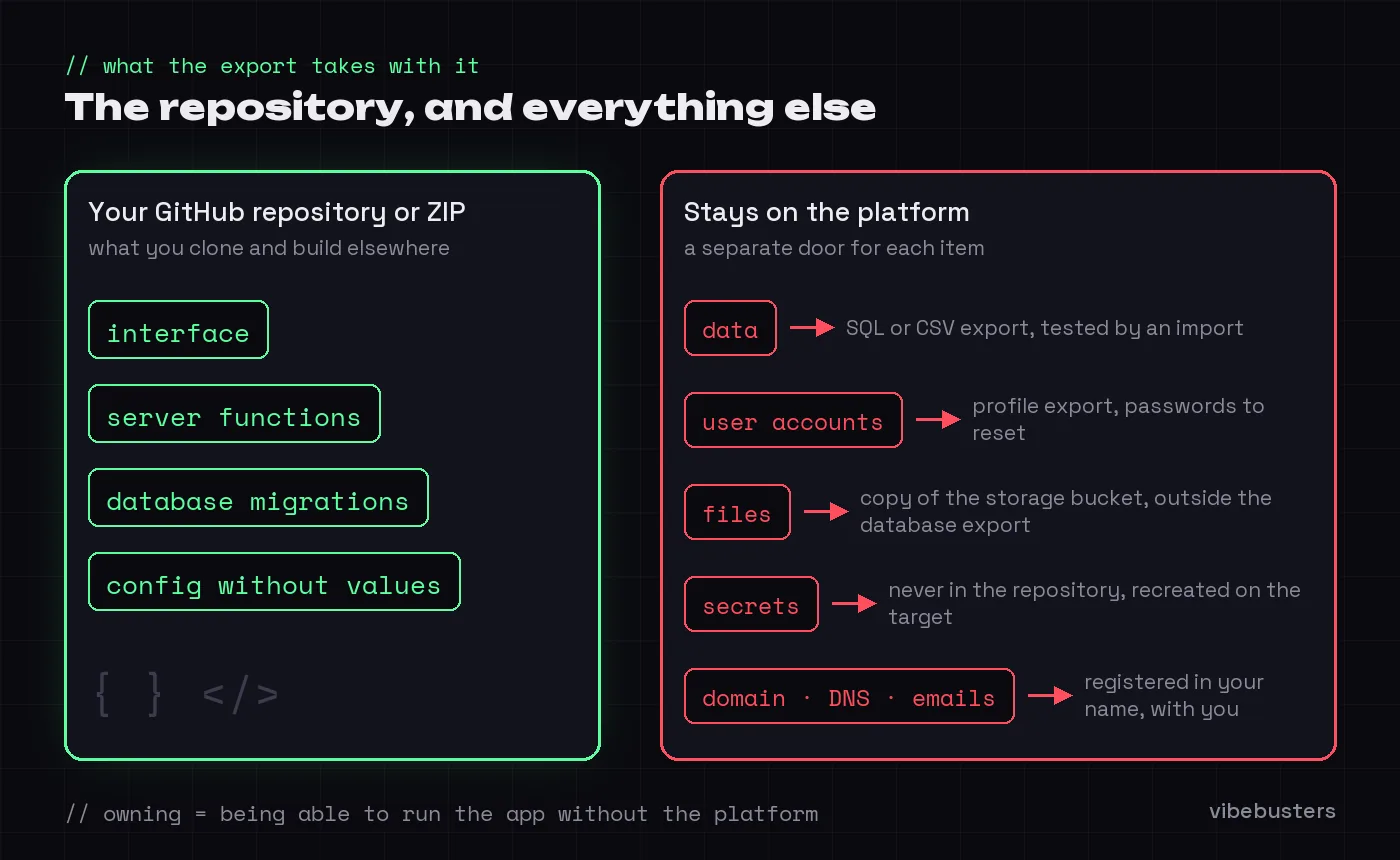
- Data. Rows in the database are exported through a separate mechanism: a SQL dump, a CSV per table, or claiming the database in your own account. Test the import somewhere else before you count on it.
- User accounts. Emails and profiles can usually be exported; passwords are stored as hashes, and moving them between authentication services works only in specific cases. Plan for a password reset or a "sign in again" email.
- Files. Uploaded documents and images live in a storage bucket, not in the database. Lovable's Cloud export, for example, explicitly leaves them out.
- Secrets. Keys for payment, email or AI services never belong in a repository. You recreate them on the target, which means you need to know where each one was issued.
- Production configuration. Domain, DNS records, certificates, scheduled jobs, logs, alerts and the address your transactional emails come from. If the domain is registered in someone else's account, the app is still not yours.
Do you legally own AI-generated code?
Ownership stacks in three layers, and the confusion between them is where projects get stuck. This section reports the facts we verified; it is not legal advice, and a contract or a dispute deserves a lawyer.
Layer 1: the contract says it is yours
Every major platform assigns the generated code to you. Lovable's terms (version of 28 August 2026): "you own your Customer Data, including the applications, websites, or other projects you build using the Services", and "you also own any AI Output generated for you". Base44's terms (Wix.com Ltd, 22 June 2026): "the Customer owns all rights, title and interest in the code and applications generated by the Platform". Vercel's AI Product Terms (17 March 2026) "assign to you Vercel's rights, if any, in the Output" and add that "the Output may not be unique". Replit (3 August 2026): "you retain any and all of your rights to any content you submit". Bolt runs under StackBlitz's terms, dated 10 January 2024, which state that StackBlitz "does not claim any ownership rights" and contain no clause about AI at all.
Read the next paragraph of each document, because that is where the licence you grant back lives. Lovable takes a "worldwide, perpetual, royalty-free license" on your Customer Data for its business purposes, model training included, and lets you opt out at any time, free of charge and regardless of your plan. Base44's licence is "irrevocable, non-exclusive, worldwide, royalty-free, perpetual" and covers model training and marketing. Vercel may train on Hobby and trial Pro content, keeps training off by default on paid Pro plans, and gives Enterprise customers a contractual guarantee. None of this removes your ownership. It does mean that "you own the code" and "only you can use the code" are two different sentences.
Layer 2: copyright protects what a human decided
In the United States, the Copyright Office's report of 29 January 2025 concludes that output generated by AI without sufficient human contribution cannot be copyrighted, that prompts alone do not amount to authorship, and that the human parts of a mixed work can be protected. On 18 March 2025, the D.C. Circuit confirmed in Thaler v. Perlmutter that an AI cannot be an author, and the Supreme Court declined to review that decision on 2 March 2026.
In the European Union, the Court of Justice has required since Infopaq (2009) and Painer (2011) that a work be "the author's own intellectual creation", reflecting free and creative choices. There is no specific European rule for AI output yet; a study published by the European Parliament in July 2025 reads the case law the same way: typing a prompt does not make you an author, while selecting, iterating, editing and combining can. Belgian law (Code of Economic Law, Book XI) applies the same originality standard.
The practical reading: the architecture you chose, the code you edited, the tests you wrote and the way you assembled the pieces are yours to protect. A block generated in one shot and never touched stands on weaker ground and, as Vercel's terms note, may be served to another user. For a business, that rarely matters day to day. It matters in a due diligence, an acquisition or a dispute with a former contractor, which is why the third layer counts more than the first two.
Layer 3: control is what you can actually run
The layer that decides everything is operational. You own the app when the repository sits in an account you administer, when the data can be exported and imported somewhere else, when the user accounts and files are recoverable, when every secret can be reissued, and when the domain and the sending address of your emails are registered to you. Each of those is a setting or an account, and none of them appears in a contract. An app can be perfectly fine staying on Lovable and still fail this test on the domain alone.
The 20-minute ownership test
Do this on a machine that has never opened the project, or ask a developer to do it while you watch.
- Clone the repository from your own account. If you need someone else's login to get there, stop and fix that first: transfer or recreate the repository under your organisation.
- Install and build.
npm install, thennpm run build, or the equivalents listed in the README. It should complete with no hidden file from the platform and no missing package. - List the variables without their values. An
.env.examplefile or a README section should name every key the app needs. If the list does not exist, write it now, while the platform still shows you the settings. - Export the data and import it elsewhere. A dump loaded into a blank database, or a CSV opened in a spreadsheet, whichever fits the app. Count the rows.
- Check the accounts. Domain registrar, database project, hosting, payment and email providers: each should belong to your organisation's email address, with two-factor authentication on and a second administrator named.
- Find every secret's origin. For each key, note which dashboard issued it and who can rotate it.
Six ticks and you own the app in the sense that matters. One miss and you know exactly what to fix, which is already most of the work.
What to do when one item fails
The repository is in a contractor's account: ask for a transfer to your organisation, then reconnect the platform to the new location, since Lovable and v0 tie the sync to a specific repository. The build fails outside the platform: the code depends on something the platform provides, most often an SDK or an environment file, and a developer needs to name it before anyone talks about migrating. The data export is not documented: run it now, in a quiet moment rather than during an incident, and note the limits (Lovable Cloud's 5 GB and 24-hour cadence, Base44's per-table CSV). The domain or the email sender belongs to the platform: connect a subdomain of your company and move the sending address, both covered in the pre-launch checklist.
None of this requires leaving the platform. Lovable, Bolt, v0, Replit and Base44 can remain the right place to build; the point is to be able to leave, which changes the conversation with your clients, your investors and your next developer. When the map is unclear, the Scan draws it on your real project: code, data, accounts, files, secrets and production, each with its evidence and its recommended action, without assuming that a migration is needed.