Your app runs, the demo went well, and then a client writes: "the link does not open on our network" or "your invitation landed in quarantine". Good news: it is almost never your code. It is the address your app lives at and the address it writes from. Both can be fixed in a few hours, provided you check the right things in the right order.
Does the problem really exist?
Yes, and it is documented. Since February 2025, Proofpoint has detected tens of
thousands of *.lovable.app URLs used in phishing campaigns every month; a single one of
them sent hundreds of thousands of messages to more than 5,000 organisations. In April
2025, Guardio showed that a fake Microsoft sign-in page could be generated and hosted on
a lovable.app subdomain in a few prompts. Lovable responded: real-time detection since
July 2025, more than 300 sites removed in two weeks in August, and Guardio's safe
browsing engine integrated in November 2025.
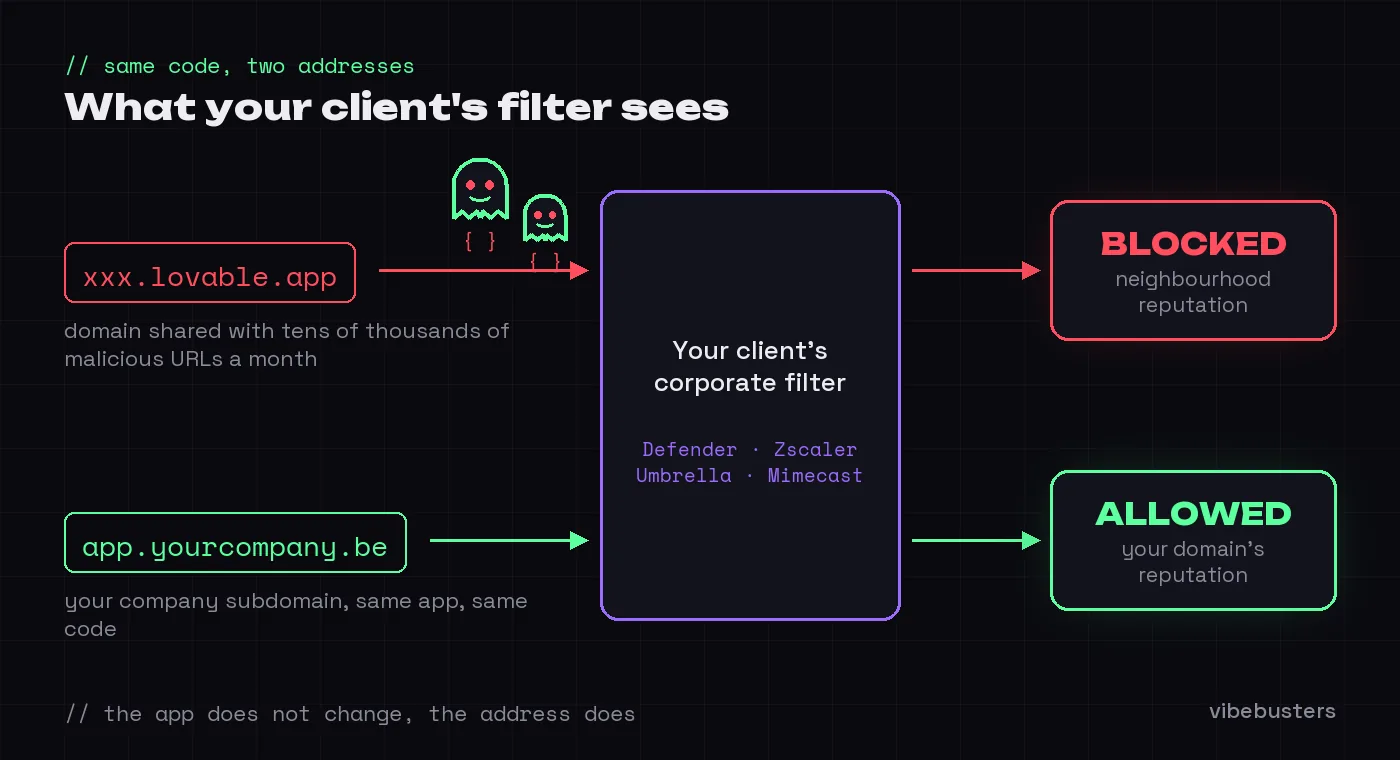
The catch is that corporate filters have a long memory. Email gateways (Microsoft Defender, Proofpoint, Mimecast) and web proxies (Zscaler, Cisco Umbrella, Netskope) can place shared hosting in risky categories, and Proofpoint explicitly recommends that organisations adopt allow-listing policies around "frequently abused tools". Your app shares its domain with those campaigns: it inherits their reputation, not yours.
The same logic applies to email. By default, the authentication emails of a Lovable
Cloud app are sent from no-reply@auth.lovable.cloud, a domain pooled across every
project, with a DMARC policy of p=none (verified in DNS on 11 September 2026). On
Supabase, the default service is limited to 2 emails per hour and only writes to team
members. And since May 2025, Microsoft rejects high-volume senders without SPF, DKIM and
DMARC, as Gmail and Yahoo have done since February 2024.
1. Which address did you share?
Ask the client for a screenshot of the block page. A Zscaler, Umbrella or Defender page
shows the category applied ("Newly Registered and Observed Domains", "Web hosting",
"Phishing"), and that category tells you what to fix. If the address you shared ends in
.lovable.app, you already have the answer: it is not your app that is blocked, it is
the neighbourhood. And that neighbourhood gains tens of thousands of bad neighbours a
month.
2. Does the app live on a subdomain of your company?
Lovable lets you connect a custom domain on paid plans: an A record to 185.158.133.1,
a _lovable TXT verification record, and the SSL certificate is issued automatically.
Pick a subdomain of your main domain, for example app.yourcompany.be, and set it as the
primary domain. Filters that block "newly seen domains" look at the registered domain:
app.yourcompany.be inherits the age and reputation of yourcompany.be.
Note that the xxx.lovable.app URL keeps existing and redirects temporarily (Lovable
does not issue 301 redirects). So stop sharing it, in emails as well as in presentations.
3. Which address do the app's emails come from?
Send yourself an invitation and open the full headers ("Show original" in Gmail, "View
message source" in Outlook). If the sender is no-reply@auth.lovable.cloud or a default
Supabase address, your clients receive a message from a stranger containing a link to a
monitored domain. Two possible fixes: on paid plans, Lovable's Emails feature sends from
your domain and configures SPF, DKIM and DMARC (50,000 transactional emails per month
included); with Supabase, connect a dedicated SMTP provider (Resend, Postmark, SendGrid)
on a domain you control.
4. Is your own mailbox configured correctly?
This is the point everyone forgets. As soon as the app writes on behalf of
yourcompany.be, the DNS configuration of your domain decides whether the message gets
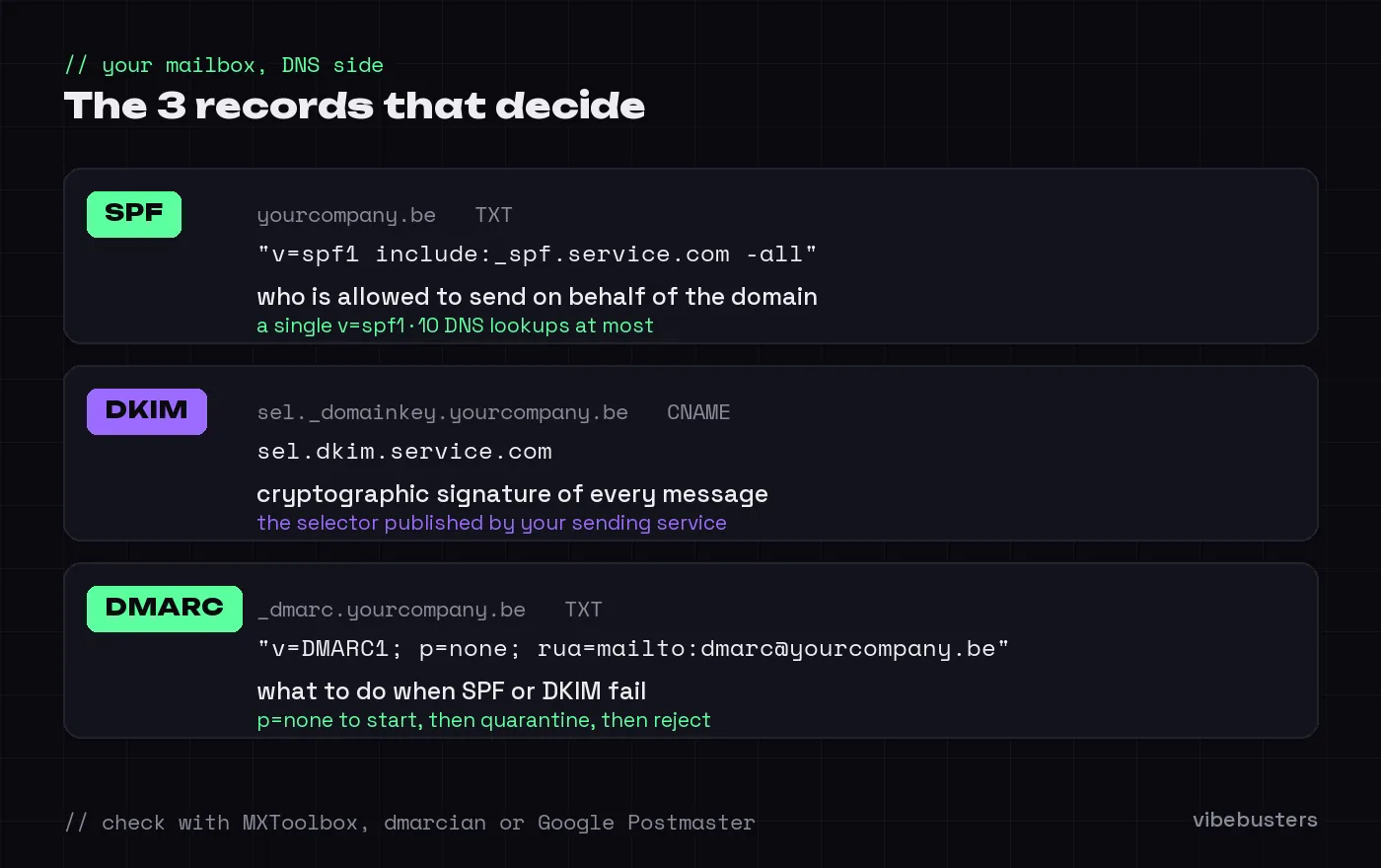
through, not Lovable's. Three records to check (MXToolbox, dmarcian or Google Postmaster
are enough):
- SPF: a single
v=spf1record, which includes the app's sending service (Resend, Mailgun or Lovable) and stays under the 10 DNS lookup limit; - DKIM: the selector published by the service, otherwise the signature fails;
- DMARC: at least
p=nonewith aruaaddress to receive reports.
Two frequent cases. Your domain already has a DMARC policy of p=reject (very good),
but the app sends without alignment: it is rejected by your own policy. Or the SPF record
was edited by hand and contains two v=spf1 records, which invalidates it entirely.
5. Do the email links point to the right domain, and do they survive the scanner?
Two checks. First, the Site URL and redirect URLs of your authentication must use your
subdomain. Otherwise the email leaves from your domain but points to a .lovable.app
link, which Defender Safe Links rewrites or blocks.
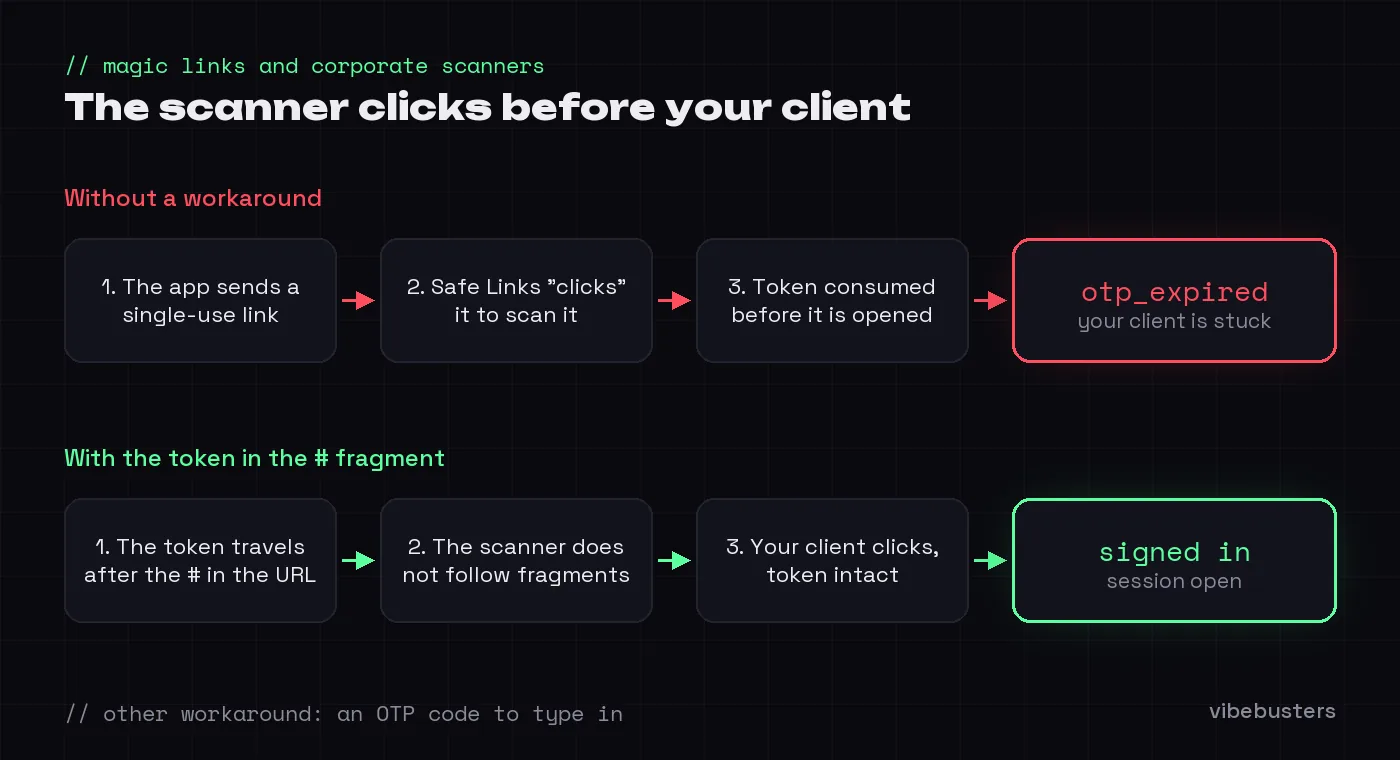
Second, corporate scanners (Safe Links, Barracuda, Mimecast) "click" links before the
user does. A magic link or a single-use password reset link is consumed before it is
opened, and the client sees otp_expired. Supabase documents the problem and two
workarounds: put the token in a URL fragment (#) that scanners do not follow, or switch
to an OTP code the user types in.
The fix, in order
- Connect
app.yourcompany.beas the primary domain in Lovable, and share only that one from now on. - Send every app email from your domain (Lovable Emails or a dedicated SMTP provider), with SPF, DKIM and DMARC aligned.
- Update the Site URL and redirect URLs so that every link points to your subdomain.
- Test with a Microsoft 365 mailbox and a Gmail mailbox: SPF, DKIM and DMARC headers
showing
pass, link opening without a warning, magic link still valid. - If a client is still blocked, send their IT department a short allow-list request:
your subdomain, your sending domain, the purpose. Never ask them to allow
*.lovable.appas a whole: their IT will refuse, and they will be right.
None of these steps requires rewriting the app. A domain in your name is already part of the pre-launch checklist, and ownership of transactional emails is one of the safeguards to verify before opening a Lovable app. The Scan checks these points on your actual project, with evidence and an action for each one.